Integers and Vectors in C/C++
Tags:comp_sci tutorial Contents:
- What’s this all about?
- My plan for the day
- Integers
- Vector
- VectorFreeFunction
- Length
- Realloc
- Append
- Insert
- Accessing the Nth Element
- Delete
- Sort
- Map
- Search
- That’s all it takes!
What’s this all about?

You might ask, why am I discussing this particular topic? Well recently, I have been following an online offering of Stanford’s CS107 course which can be found here. It discusses the implementation of lower level stuff within an operating system, such as how the data types we use in our daily life (e.g. integers, floats and strings) are actually laid out in memory. I especially love how we also get to leverage our knowledge of the intricacies of such implementations to then implement even more commonly used data structures such as Vectors and HashSets.
My plan for the day

To give you a taste of the fascinating stuff we learn in CS107, I will give you a quick introduction to a data type like integer is represented and laid out in memory. I will then talk about how we would implement a Vector in pure C that would allow us to store the integers that we will soon talk about. This implementation of a Vector will leverage our knowledge of the would-be representation of integers in memory.
Integers
I am going to make the assumption that you already know what an integer is, what I will then do is illustrate how might we represent something like this in memory. But first, I will first introduce the notion of bits and bytes. A bit can take either one of two values, i.e. 0 or 1. In other words, we can use a bit to represent the absence/presence of something. Next, 8 bits make up a byte, naturally within a single byte we can imagine that all 8 bits are next to each other within memory.
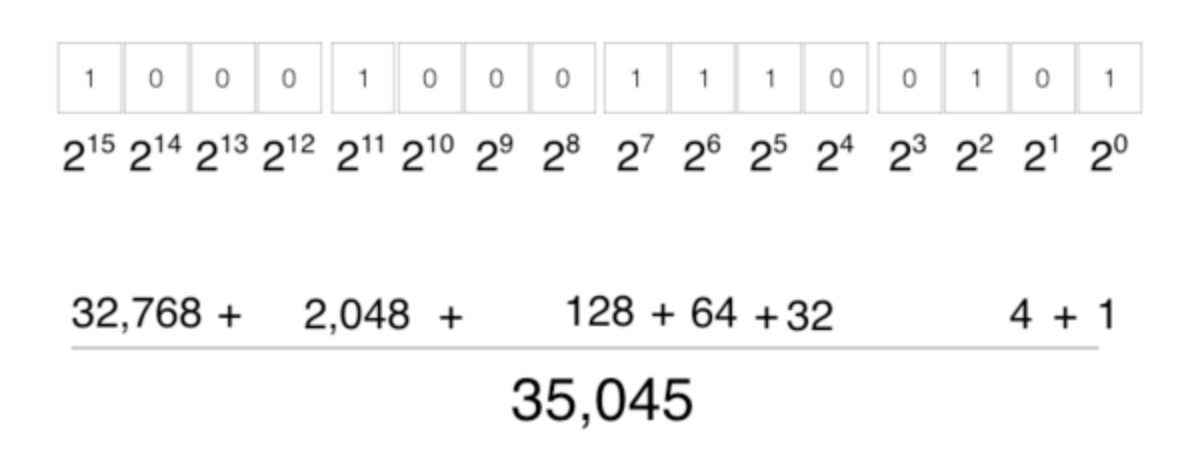
Here comes the interesting part, a typical integer is represented using 4 bytes, i.e. 32 bits. Using these 32 bits, we need to be able to represent every single possible integer that the client needs (we won’t be able to, but for practical purposes we come close to being able to do so). The above diagram doesn’t illustrate the entirety of the 4 bytes I previously mentioned, it merely shows what 2 bytes (16 bits) would look like. Reading from right to left, each bit represents the absence or presence of that particular power of 2. Hence, the integer represented in the diagram is 20 + 22 + 25 + 26 + 27 + 211 + 215 = 35045. Since there are 32 bits in 4 bytes, there are 232 = 4294967296 patterns that can possibly be represented. Which means that we can easily represent every single integer from 0 through 4294967295. However, we would also be interested in representing negative numbers, we achieve this by using the most significant bit (the left most in the context of our diagram) to represent whether a number is positive or negative. Having sacrificed one bit to denote the sign of the number, what’s left allows us to represent numbers in the range of -2,147,483,648 to 2,147,483,647.
Vector
Now that we have a rough idea of what an integer is like, let’s consider writing a Vector class from scratch in the context of C. As a language, C allows the programmer to really get down and dirty to mess with dynamic memory allocation, pointers and whatnot. This stuff may sound intimidating to the uninitiated, but this is the exactly the kind of stuff that we want to leverage to build this Vector class.
Dynamic memory allocation means that there are a couple of responsibilities that the programmer now needs to take care of:
- Asking for memory when necessary.
- Reallocating the given memory when more memory is requred.
- Free-ing the memory when it is no longer in use.
In order to store something, we need to allocate precisely the right amount of memory to store it, we are also responsible of keeping track of where it is and how much memory was allocated. But then again, we cannot only be responsible of creating something without eventually having to dispose of it when it is no longer needed, otherwise there would be an ever increasing amount of memory that is taken up unnecessarily! With all that being said, you now have a very rough idea of the work that needs to be done. Now it’s just a matter of actually doing it!
Pointers
Before we get down and dirty with the implementation of a vector, I would need to do a brief introduction of the notion of ‘pointers’. A pointer is basically a variable that points to the addresss of another variable.
To briefly illustrate how a pointer works in C, suppose that I define the following int *i = 7;. Here the variable i itself is not an integer, instead i is a pointer to some place in memory that contains an integer with the value 7. This means that if we follow up by doing something like *i = 8;, the value of i itself remains the same, however the integer that it points to will now have its value changed to 8. The * notation is used to dereference a pointer. Dereferencing a pointer means the following, we follow the pointer to where it points to and we get access to the value located there. Perhaps now things are clearer, if i is a pointer to an integer, *i deferences the pointer and hence we get an integer.
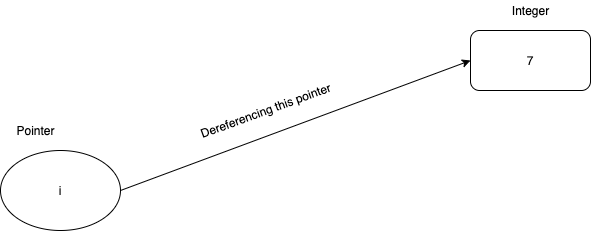
Pointers are ubiquitous in C programming, and it is so for a good reason. Pointers are just 4 byte figures, and they can be used to point to anything and everything. Suppose that there exists a huge data structure in your program, and you wish to pass it as a parameter to a particular function call, it would an incredible waste of space to pass in the entire data structure! You could alternatively set up your function in a way so that it accepts a pointer to the same data structure, this way the function will still be able to access the value of the said data structure by dereferencing the pointer.
Vector Struct
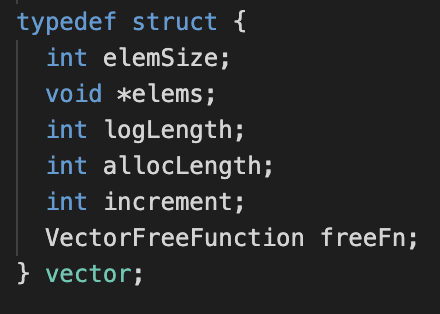
In C, the closest thing to a class and object that we can get is a struct, we make do with what we can get. If you are familiar with the concept of a class, a struct is basically the same thing (well it compiles to nearly the same thing!) with minor differences.
In a class, the address/reference to the instance of the class is always passed to every method call. A struct also does not have the notion of public and private attributes and methods, everything is “public”. In our case, our vector struct contains numerous attributes
and methods that will be instrumental to its operation during runtime.
We assume that element size stays constant throughout the use of a single vector, in other words we expect that any instance of a vector is only used to store
data of a particular type. Suppose that we intend to store integers within an instance of a vector, the elemSize would then be 4 because integers take up 4 bytes of memory.
void *elems is a pointer to a blob of memory that we shall use to the store the elements of the vector, this will be further elaborated on momentarily.
Here, we have the notion of a logical length, and an allocated length. The logLength is incredibly simple to understand, it is merely the number of elements within the vector.
The allocLength on the other hand refers to the number of elements that can potentially be stored in the amount of memory that has been allocated to the vector
at any point in time. What really happens is that we will gradually allocate more and more memory to a vector instance as the number of elements it contains increases,
this is relevant because we do not want to allocate a huge block of memory to a vector from the get-go. increment is incredible simple, as it simply denotes how much will we
expand our vector by when necessary, for the sake of simplicity we shall assume that the vector has its size increased by the same amount every time. freeFn might seem like an odd one, but what it really does is store a function that knows how to dispose of elements within the vector. If this is confusing, consider this, as mentioned before dynamic memory allocation brings with it the need
to free up memory once we are done. Built-in data types like integers and floats will automatically be freed as they fall out of scope. However, suppose that the elements in the vector are themselves dynamically allocated, which means that
we are actually responsible of disposing of them when we are done. The freeFn is a function that knows how to correctly free each element within the vector.
Constructor
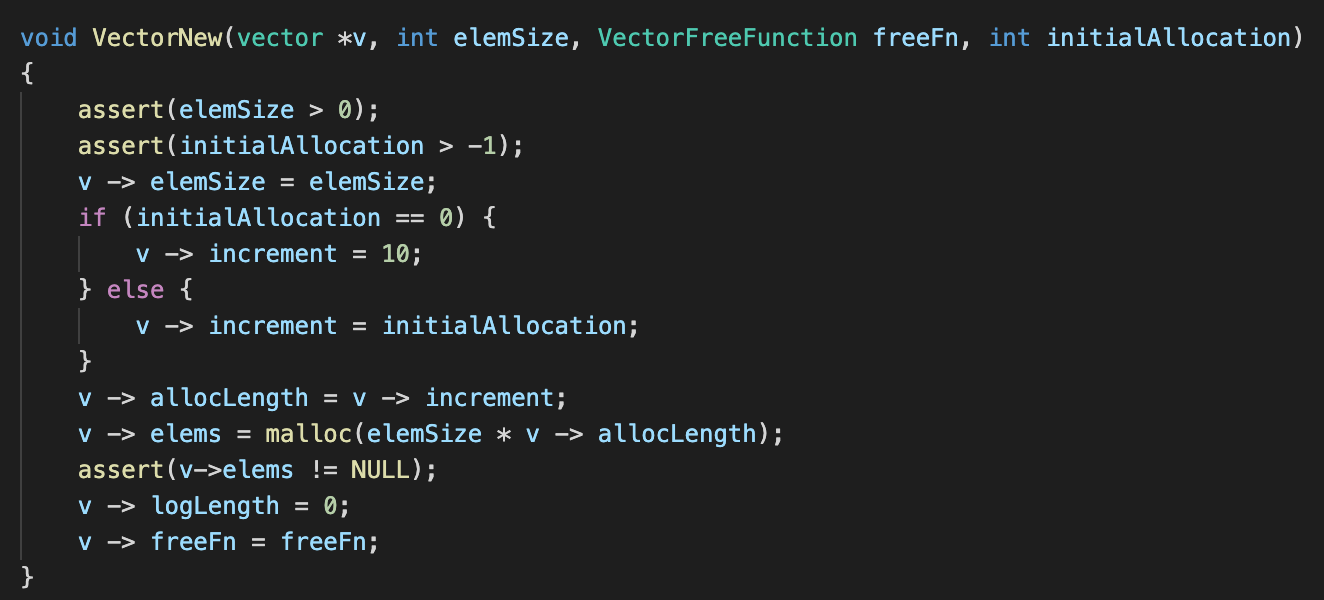
If you are familiar with object-oriented programming(OOP), you might be familiar with the concept of a constructor. A constructor is a method called upon initialisation of class, and it is responsible for getting things all set up in anticipation of the client’s usage of the said class. However, like I mentioned before, C does not support OOP (remember that we are using a struct). Hence, this ‘constructor’ that we are defining is merely something that would mimic what a real constructor would do.
Note that the first parameter vector *v is actually a pointer to an instance of a vector, remember how I said that methods in OOP typically will have references to an instance of the class? The next parameter int elemSize refers to the number of bytes that each element would take up within this vector, remember that each instance of the vector that we are implementing should only hold elements of one particular type only. This will probably be one of the most used attributes of our vector implementation. As mentioned before, the VectorFreeFunction freeFn is a function that the client will need to provide, and it is responsible of disposing of the elements within our vector (whenever necessary). int initialAllocation is something important too, remember that we will be dynamically allocating memory to store the client’s elements? Therefore, we need to know just how much memory should we allocate initially.
Moving on to the actual implementation of the function, we do a couple of things that are very intuitive, and also a few things that might be new to someone who has never worked with C before. We first make sure that elemSize is greater than zero for obvious reasons. We also allow initialAllocation to be 0, and the client can opt to pass in such a value, after which we shall set it to a default value of 10.
-> notation
For those who are strangers to the -> notation, I shall provide a brief introduction. Suppose that the variable on the left side of the arrow is a pointer, pointer -> attribute basically follows the pointer to where it points to and accesses the attribute on the right of the arrow. In other words, v -> elemSize = elemSize basically follows the pointer to where the vector instance really resides in memory and accesses the elemSize variable, and finally sets it to the value of elemSize (which is a parameter of this function).
Here’s our strategy for implementing our vector, we are going to initialise it so that it has enough memory to store allocLength (allocated length) number of elements. At the start, although it can hold allocLength number of elements, it really has a logLength (logical length) of 0. And we do exactly that, the vector has the attributes allocLength and logLength initialised in that exact manner.
malloc
malloc is a function that is core to C programming, and it is something that is built-in within the language. It takes precisely one parameter, i.e. how many bytes of memory should it allocate on your behalf. malloc will go to the heap and find a block of memory that fits your requirements, it will then reserve it for your use and return a pointer to the said block.
We know that we want our vector to have an initial capacity of allocLength, to make it happen we call malloc and tell it we need a blob of memory that is elemSize * v -> allocLength wide. Note how we don’t directly do malloc(v -> allocLength) as we need to take into account the size of each element! Remember that malloc returns a pointer to the allocated block of memory, we then assign it to v -> elems. However, there is a chance that malloc fails to get you the space that you need (perhaps you are out of memory?), hence we need to check if it returned us a NULL pointer.
Lastly, we also assign a freeFn to each vector, which I will briefly explain next.
VectorFreeFunction

The above is the prototype of the VectorFreeFunction. You might say that this contains nothing, but that’s just it, only the client knows how each element in the vector should be cleared up. The client will be responsible of writing a function that disposes of the elements whenever it is required, otherwise the client will be expected to pass in a NULL pointer.
Length

What this function does is pretty self explanatory. But then again, you might ask, if the implementation of the function is so simple, why do we even bother defining it? This is because we do not want the client to be directly interacting with v -> logLength, this is consistent with the Encapsulation aspect of OOP. Although there is no notion of hidden variables, we still try our best to make the usage of our vector implementation as clean as possible.
Realloc
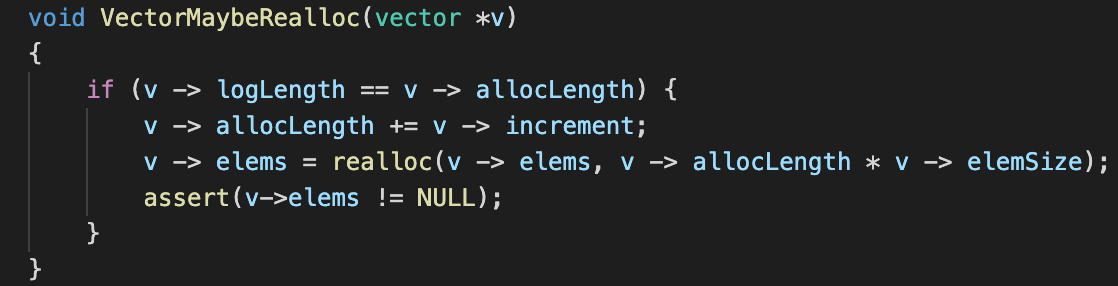
Before moving on to the rest of the implementation, we first need to get this out of the way. Suppose that we wish to add a new element to our vector, but unfortunately we find that it has reached its maximum capacity, i.e. v -> logLength == v -> allocLength. Sticking to the strategy that we defined earlier, we seek to increase its allocated length by a fixed amount that was decided in the initialisation of the vector. Hence, we increase the allocLength by that amount. Next, we need to actually handle the increase of the allocated size.
realloc is the good friend of malloc. Given that we have a pointer to a block of memory that allocated by malloc, realloc is capable of extending our current block of memory to have a bigger capacity, or finding us a new block of memory that is bigger, and then returning a pointer to it. realloc takes 2 parameters, the first is a pointer that malloc once returned, the second is the size of which realloc should expand the block of memory to. Suppose that you pass realloc a size that is smaller than the space the block of memory is currently occupying, most implementations of realloc simply just do not do anything, i.e. we do not need to reallocate the memory to make it smaller.
Append

Appending to a list is something we do quite often, to pull off this function, the client is required to pass in a pointer to the element that needs to be appended to the list. But before we do any appending, we first check if a reallocation is necessary. If the coast is clear, we then call memcpy.
memcpy
memcpy takes 3 parameters, the first parameter is a pointer to the destination of which the copying of bytes should occur. The second parameter is the pointer to the base address of the bit pattern that we wish to copy to the destination. The third parameter is simply how many bytes that needs to be copied. In a nutshell, memcpy copies an arbitrary amount of bytes from the base address of the source pointer to the destination.
And if you think about this, this makes perfect sense. We copy the bit pattern of the element that the client provides to the end of the array by leveraging memcpy, and that’s it! Also, we musn’t forget to increase the logLength of the vector.
Insert

Insert is basically a more powerful version of append, because the client gets to choose where does he want the element to be inserted at. It takes one more parameter than VectorAppend, i.e. the position in which the element should be inserted at. We do the necessary check that the position> to add the new element in is actually a valid position in the vector. As before, we also check if a reallocation is necessary. To make things easier, if the client decides to add an element at the end of the vector, we should just call VectorAppend which basically does exactly that. But otherwise, we are in for a little bit more work.
memmove
memmove is the more sophisticated cousin of memcpy. This is because memcpy has the requirement that the source and destination bit patterns do not overlap with one another. memmove on the other hand, checks for such an overlap and does the necessary adjustments to pull off what memcpy does.
Back to the insert operation, suppose that the client wants to insert an element in the middle of the vector, we would need to then push all the other elements to the right to make space for this new element. And that is precisely what the first call to memmove does, recall that the function prototypes of memmove and memcpy are the same, i.e. they take the same parameters. Also note that if we are copying elements such that they all move one ‘unit’ to the right, there is a chance that the source and destination bit patterns will be on overlapping blocks of memory.
The subsequent call to memcpy does the same thing as the one in VectorAppend did. Notice that since we know for a fact that no overlap in bit pattern can possibly occur here, we opt to use memcpy instead of memmove. Since memmove checks for overlaps, unnecessarily doing so makes the implementation slower and we should avoid it whenever possible.
Accessing the Nth Element
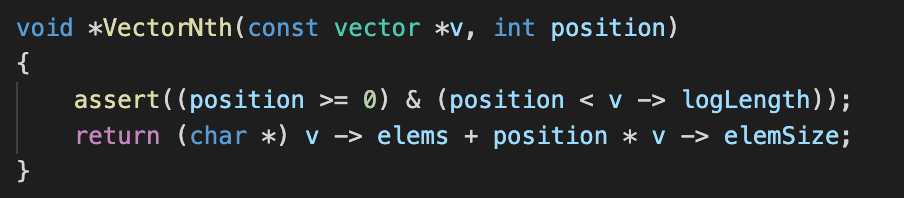
Given that we have the means of populating our vector, we now need a way to access the nth element of the vector, alternatively this is also called indexing into the vector. The responsibility of this function is simple, given an integer which is less than the logical length of a vector, the function will then return a pointer to the element in that particular position of the vector.
The implementation of the function itself is pretty simple, we just need to return a pointer that is position number of elements worth of bytes away from the base address of the elements.
Delete
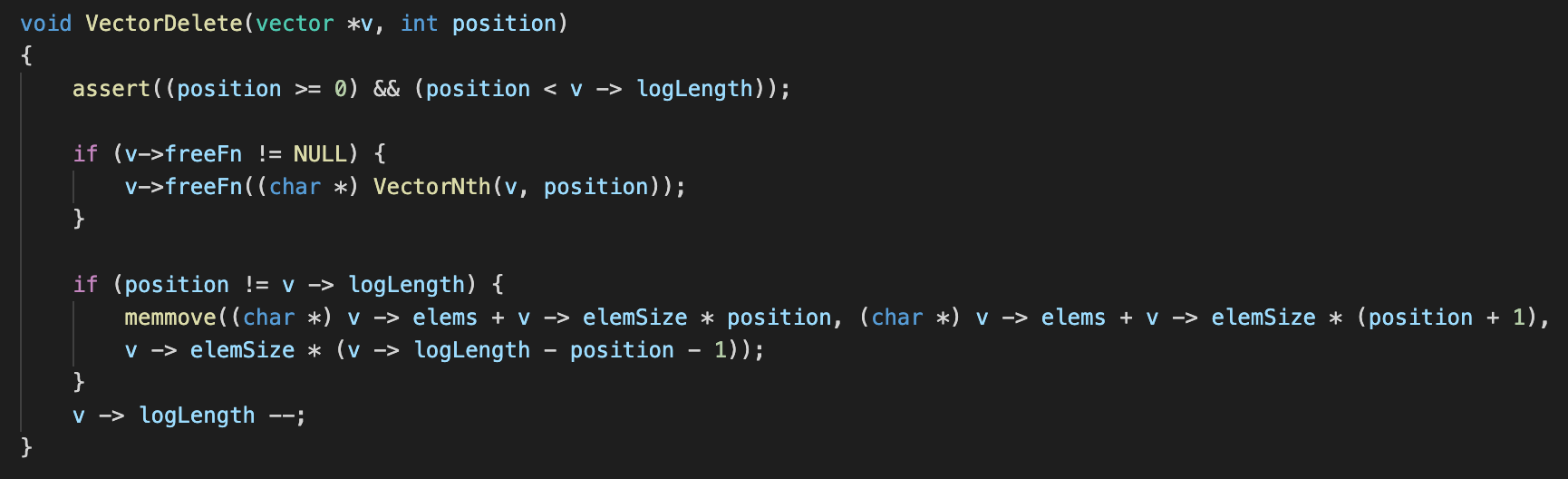
Now that we are capable of adding things to the vector and indexing into it, we also need to know how we can remove things from it. The function requires the client to tell it which element to remove. First things first, function first checks if a freeFn was defined, if it is defined, it would mean that the elements require additional treatment to be disposed of. Remember the rule of thumb I mentioned earlier, if memory was dynamically allocated using malloc, it would then need to be free-ed, the freeFn is responsible of making sure that this all happens correctly. We leverage VectorNth to get a pointer to the element to be free-ed, and we let the freeFn do its job.
Suppose that the element the client wants to remove is the last element in the vector, then all we have to do is ignore the last element in the array and decrement the logical length (remember that if the element requires disposing of, the freeFn has already taken care of it). However, suppose that the element that the client wishes to remove is in anywhere but the last position of the vector, it would mean that we would need to shift every element to the right of that position one unit to the left. Therefore, we need to copy bit patterns in order to shift things to the left, it is probably not too difficult to figure out that source and destination bytes would definitely be overlapping, hence we make use of memmove instead of memcpy.
Sort
VectorCompareFn

The VectorCompareFn has two parameters, each of them is a pointer to 2 elements that we wish to compare. If the first element is ‘greater’ than the second element, the function is expected to return a positive integer, if the first element is ‘lesser’ than the second element, the function is then expected to return a negative integer. If they are both equal, the function is expected to return a zero. The sorting algorithm will then sort the elements of our vector based on the behaviour of this comparison function. The client will be responsible of providing our vector implementation with this function, since no one but the client is really aware of what elements will be placed inside a vector.
Implementation

When you have a list of items, it is a natural that you would want to sort it. We make use of a C library function qsort to help us with the sorting. It takes a couple of parameters, the first element is void *base, which is a pointer to the base address of the block of memory that we use to store our elements. The second parameter size_t nitems is the number of elements contained in our vector. The third parameter size_t size refers to the size in bytes of each element in our vector. The last parameter is a pointer to a function that can be used to compare two elements that can possibly be found in an instance of our vector, and this plays a part in sorting the elements.
So here’s what we pass into qsort, v -> elems as the base address of our element array, v -> logLength as the logical length of our vector, v -> elemSize as the size of each element in the vector, and finally the VectorCompareFn function that we just spoke of. The qsort function will use the information we gave it to sort the elements in place.
Map
VectorMapFunction

A VectorMapFunction is pointer to a client defined function. Given a pointer to a particular element stored in an instance of a vector, this function is responsible of applying some sort of operation on it. To fulfill its responsibility, it can optionally employ the use of the optional auxData parameter. This can also serve to make the implementation of a VectorMapFunction more dynamic.
Implementation
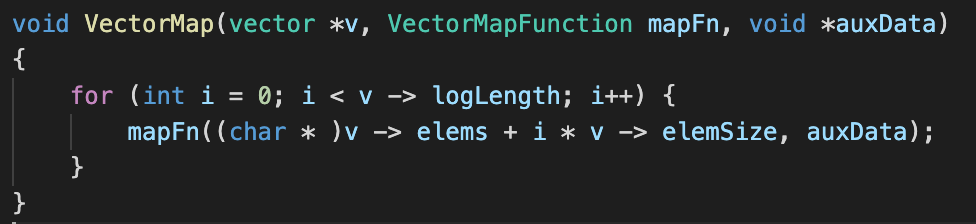
A map function is something that is extremely useful when we have a collection of elements within a vector as it allows us to do some operation to all of the elements at the same time. It takes two parameters, the first is a VectorMapFunction which is basically a function that will be applied on each element within the vector. auxData is a parameter that exists for the sake of convenience, suppose that the VectorMapFunction requires an extra piece of information in order to carry out its job, then this is how we can pass it in. All that is left is just to loop over each element within our vector and called the VectorMapFunction on it.
Search
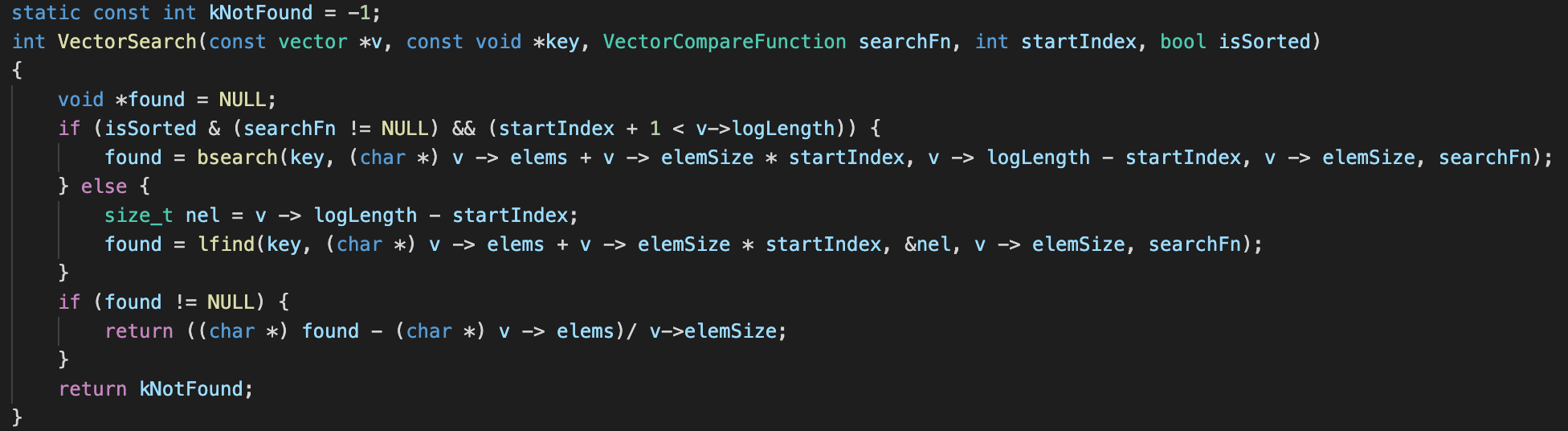
If the client had a huge collection of elements in a vector and wishes to search for a particular one, this search function becomes useful. Given a pointer to a search key as the first parameter, a VectorCompareFn as the second parameter, a startIndex which tells the vector from which element to begin search for the target key as the third element, and a boolean isSorted to tell the search implementation whether or not the elements are already sorted as a final parameter, the search function will return the index at which the search key can be found. If the key does not exist in the vector, a -1 will be returned.
Suppose that the elements are already sorted, we can leverage the built-in bsearch function that will be able to quickly complete the task. bsearch takes a few parameters, the first of which is a pointer to the search key. Next, it takes the base address of the array that is to be searched. The third parameter contains the number of elements that are within the array to be searched. The fourth parameter is the size of each element within the array, and the last is a comparison function (similar to the one that was discussed in the sort function). If bsearch is successful in finding the element, it returns a pointer to the resulting element, otherwise it returns a null pointer.
If the elements are not sorted however, we will then have to rely on another built-in C function lfind. It takes the exact same parameters as bsearch, save for a minor difference, i.e. instead of directly taking in the number of elements that are within the array to be searched, it requires a pointer to that number. Its return behaviour is also similar to that of bsearch.
If the search functions return a non NULL pointer, implying that the search was successful, we will then need to calculate the offset of the pointer to the found element from the base address of the array and divide the result by the size of each element. If the above works out we will be left with the index at which the client is able to find the desired element.
That’s all it takes!
The above is all we really need to have minimally viable implementation of a vector in C! Vector-like data structures are things that we use on a daily basis, however we tend to take it granted by virtue of how ‘primitive’ and ‘common’ it appears to us. Most programming languages will come with its own version of a vector, and they will be most certainly be built on top of the concepts we just discussed. The next time you use a vector, perhaps you will be reminded of the conveniences that the built-in vector implementation brings to the table!